
The WEHOOP platform is offered in CLOUD mode at www.wehoop.com and can be deployed on your Private CLOUD or directly on your infrastructure in On-Premise mode.
These modes (Private Cloud and On-Premise) require a collaboration between WEHOOP specialists and your IT team. In order to install and configure WEHOOP quickly and safely, certain parameters must be communicated to us and some activities must be carried out in collaboration.
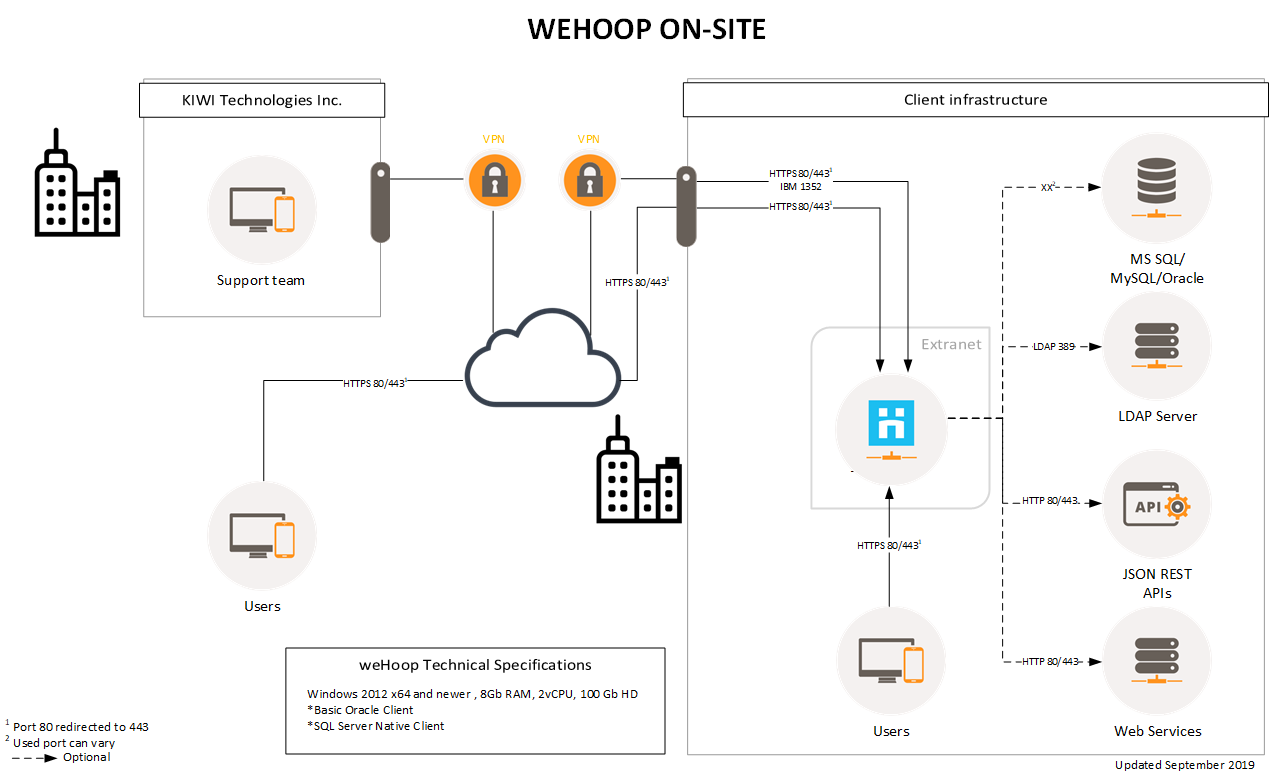
On-Premise Deployment Scheme
The diagram below shows the configuration of ports and infrastructure set up for on-premise deployment, ie on the client’s infrastructure.
Required Parameters
- User account and password for each Active Directory
- Network Address (FQDN) for each Active Directory
- Network Address (FQDN) of the SMTP relay
- Network Address (FQDN) of the application server
- IP address of the application server
- Procedures for remote access to the application server
Required Configurations
- Enter the application server at the DNS server in the following format: hoop.domaine.com
- Configure antivirus software to exclude the data directory of the application server
- Validate the backup security
- Configure SSL key on the application server
- Fill a remote access request for the application server
Hardware Specifications
In order to achieve the desired level of performance, we have established a grid as minimum specifications based on the number of users on the WEHOOP platform.
| SERVER CONFIGURATION vs USERS | <100 | <1000 | <5000 | <10000 | 10000+ |
| Windows Server 2019 and newer | X | X | X | X | X |
| PROCESSORS (vProc) | 2 | 4 | 6 | 6 | 8 |
| MEMORY (GB) | 8 | 8 | 16 | 16 | 32 |
| DISK SPACE (GB) | 64 | 128 | 256 | 521 | 768 |
Organizational Structure Import
WEHOOP offers an option that allow to support organization structure. This is where each department will be presented in a hierarchical manner. This structure will not only allow employees from located themselves inside the organization but also allow WEHOOP to question it in order to automatically route forms to the proper person.
To easily import your organization plan, ie a range of information on each department in your organization, please complete the Organizational Structure.
The first lines in this plan are for descriptive purposes. Please remove them and add the information for each department in your organization.
It is also required that the following characters are not used:
- Carriage return
- Tab
- Previous space or following the names
- Other characters / \;